
What happens when you combine more than ten years of legacy code with modern cloud architecture and AI?
I recently put that question to the test by revisiting BarFinder.com, a nightlife site I started in 2005. It still had loyal users and years of valuable data. It was also running on an architecture built for a different era. This post walks through the technical decisions behind rebuilding it, where AI helped, and where it didn’t.
Where BarFinder started
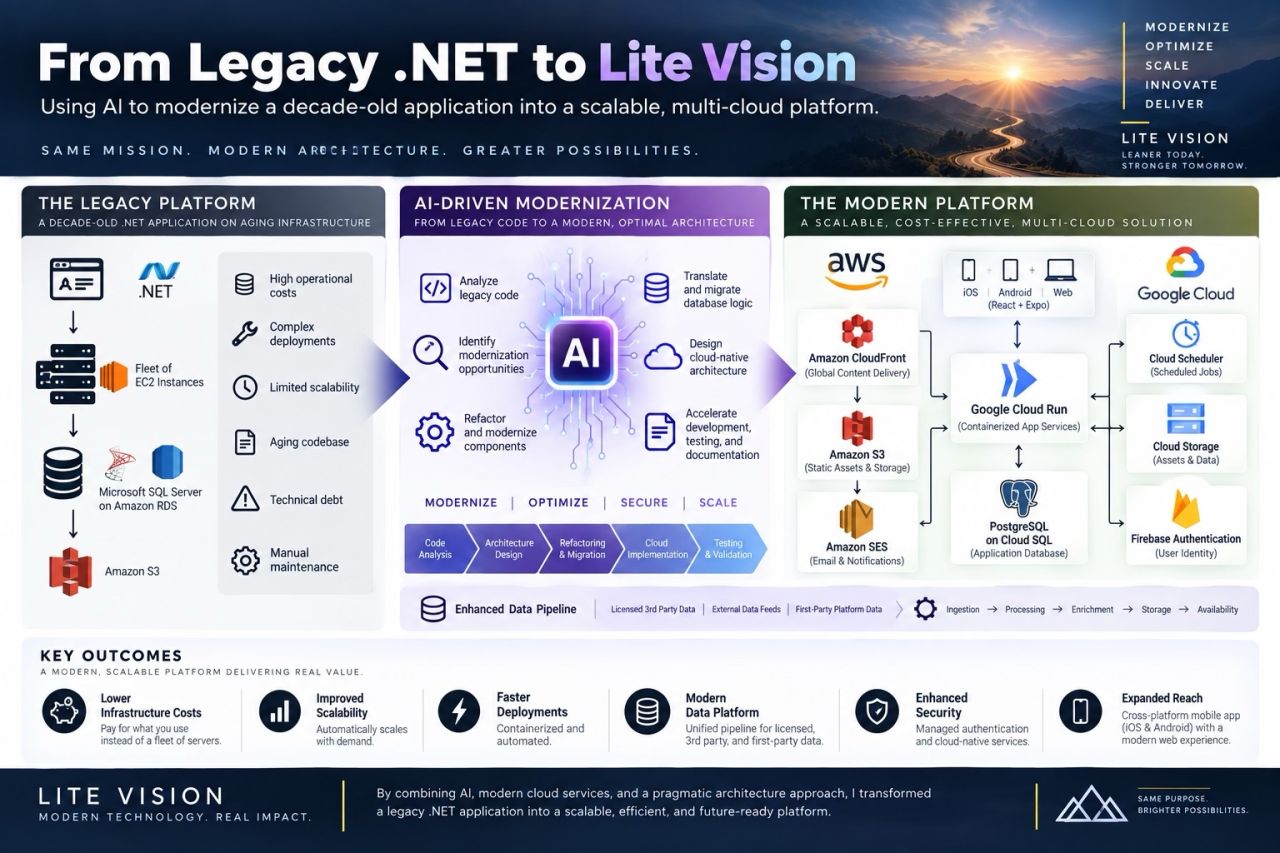
The legacy platform was an ASP.NET Web Forms application written in C# on .NET 4.0. It had grown to roughly 1,100 .aspx pages, a shared class library split into about 16 assemblies (some still targeting .NET 2.0), and a custom URL-rewriting module. It ran on a fleet of AWS EC2 instances backed by Microsoft SQL Server 2008 R2 on Amazon RDS, with Amazon S3 for files.
The system worked. But it carried the usual weight of a long-lived system:
- High fixed costs. Servers ran around the clock whether anyone was using the site or not.
- Complex, manual deployments and ongoing server maintenance.
- Limited scalability without adding more always-on capacity.
- An aging codebase on frameworks that are hard to hire for and hard to extend.
- Data debt. About 50 separate yes/no “atmosphere” columns on the listings table, HTML entities and garbled characters from years of mixed encodings, and raw WYSIWYG HTML stored in text fields.
Rather than simply migrate it, I re-architected it. Here are the decisions that mattered most.
Decision 1: Rebuild around the data instead of porting the code
A lift-and-shift to newer virtual machines would have kept all of the technical debt and most of the cost. A blind rewrite would have risked losing years of business rules buried in the old code.
So the first step was understanding. I used AI to read through the legacy code and inventory what the system actually did: its features, its rules, and its data model. With that map in hand, I started the new platform as a walking skeleton: a thin slice running end to end (database, API, website, and deployment) before building any features on top. On the same day, I took a snapshot of the existing DNS records so a rollback would always be one step away.
Decision 2: One language across web, mobile, and API
The new platform is a single TypeScript monorepo using npm workspaces:
- API: Hono on Node.js 22
- Public website: Next.js 16 (App Router) with React 19, Tailwind CSS, and Leaflet maps
- Admin console: a separate Next.js app
- Mobile: React Native with Expo, for iOS and Android
- Shared database schema: Drizzle ORM in a shared package
Using one language everywhere means one set of types. When the database schema changes, the compiler catches the impact across the API, the website, the admin console, and the mobile app before anything ships. For a small team, that kind of leverage matters more than any single framework choice.
Decision 3: Serverless containers instead of a server fleet
The fleet of EC2 instances became three containerized services on Google Cloud Run (API, website, and admin), plus scheduled background jobs. Cloud Build builds the images, Artifact Registry stores them, and a script deploys them, with separate development and production projects.
Cloud Run scales to zero when idle and bills CPU only while it is handling requests, which is ideal for a site whose traffic peaks on evenings and weekends. I also set a deliberate ceiling on how far each service can scale. That cap is tied to the database’s connection limit, so a traffic spike can’t overwhelm the database or produce a surprise bill. Only the API talks to the database; the website and the mobile app both go through it.
Decision 4: PostgreSQL, with a cleaned-up data model
SQL Server gave way to PostgreSQL on Cloud SQL: no licensing costs, a strong open-source ecosystem, and managed backups.
The good news was that the legacy code mostly used inline SQL rather than stored procedures, so there was relatively little T-SQL to translate. Most of the work went into the data model itself. The 50 atmosphere columns became a proper tags table. A text-normalization step decoded HTML entities, repaired garbled characters, and stripped stored WYSIWYG markup. Every schema change since then has gone through versioned migrations (76 so far).
Two details worth sharing:
- Fuzzy matching with pg_trgm. PostgreSQL’s trigram extension powers duplicate detection and description search without a separate search service.
- Keep it simple until it needs to be complex. “Near me” searches use a distance formula plus an indexed bounding box rather than a full spatial extension. As the venue table grew from a few thousand rows to more than 220,000, those queries started taking about 240 ms on their own, and some admin screens slowed to 16 to 35 seconds. Adding the right bounding-box index fixed it. PostGIS stays on the list for when the product actually needs it.
Decision 5: Mine the legacy data, don’t just copy it
Instead of one big database copy, the legacy data moved through 19 small, numbered import scripts. Each one ran first as a dry run against development, then for real in development, and only then in production.
- Legacy listings were matched to current venues by location and name, so old ratings, photos, bands, and drink data landed on the right place.
- More than 13,000 neighborhoods came across intact.
Decision 6: Keep AWS where it already did the job well
The goal was never “multi-cloud.” The goal was the simplest, most cost-effective architecture for each job. Some AWS services were already doing exactly what they needed to, so they stayed:
- Amazon CloudFront sits in front of Cloud Run as the edge layer and web application firewall. CloudFront doesn’t cache dynamic HTML, so listings are always fresh, but it caches versioned static assets at the edge. A small CloudFront Function handles the www-to-apex redirect before a request ever reaches the application.
- Amazon S3 for storage.
- Amazon SES for transactional and notification email, using credentials that can send email and nothing else.
- Route 53 for DNS, which made the cutover a controlled, reversible step: I snapshotted the records first and switched them with a short TTL so a rollback would take effect within minutes.
Decision 7: Don’t build your own login system
Firebase Authentication handles Google, Apple, and email sign-in for both the website and the mobile apps. The API verifies every Firebase token on the server, and PostgreSQL keys users by their Firebase ID. The split is clean: Firebase owns identity, and PostgreSQL owns everything else. A service built for exactly that handles password storage, resets, and social sign-in.
Decision 8: A data pipeline with provenance, and AI with a human in the loop
A venue directory is only as good as its data. The new platform brings together several kinds of sources, including public and licensed data, BarFinder’s own historical data, and information submitted directly by venue owners. Every venue keeps a record of where its information came from and when it was last verified, so any detail can be traced, corrected, and kept current.
The most useful details, such as happy hours, specials, and events, change often and are hard to keep current by hand. This is where AI does much of the heavy lifting, inside firm guardrails:
- Extract, never invent. AI records only what a source actually says. It doesn’t fill gaps with guesses.
- A closer look for anything uncertain. The system flags ambiguous results for extra checking instead of publishing them.
- A person approves what gets published. A person reviews and signs off on every change before it reaches the live site.
- Regular refreshes. The system re-checks information on a schedule and queues changes for review rather than writing them straight to the live database.
The directory now covers more than 200,000 U.S. venues. Scheduled jobs handle the platform’s routine work, from keeping events and ratings current to publishing social media posts.
Decision 9: Operate it like a production system from day one
- Secrets live in Secret Manager. Services authenticate with their own cloud identity, so there are no key files to leak, and I open direct database access only for the duration of a maintenance command.
- Monitoring checks what users actually experience. One lesson learned the hard way: a simple health endpoint can report “all good” while the database behind it is unreachable. The uptime checks now hit a page that requires the database, and they send alerts by email.
- An automated browser check of key pages runs after every deploy.
- Old URLs fail cleanly. Requests for retired .aspx pages get a proper “not found” response instead of an error page.
Where AI fit, and where it didn’t
AI was a force multiplier throughout the project. It helped me:
- Read and understand legacy code I hadn’t touched in years
- Inventory features and business rules before rebuilding them
- Translate database logic and write the data-migration scripts
- Refactor and build new components quickly
- Troubleshoot integrations across AWS, Google Cloud, and Firebase
- Compare architecture options and their cost trade-offs
- Write documentation, tests, and repeatable runbooks
The pace was the most striking part. The new codebase went from its first commit to more than 600 commits in roughly a month.
But AI didn’t replace the engineering decisions. Choosing what to rebuild and what to keep, where to put cost guardrails, which data sources to trust, and when a batch of data was good enough to publish were all human calls. AI dramatically increased how quickly I could understand problems, evaluate solutions, and execute them.
The results
- Lower infrastructure costs: pay for what you use instead of a fleet of always-on servers.
- Better scalability: services scale automatically with demand, inside deliberate limits.
- Faster deployments: containerized, scripted, and verified after every release.
- A modern data platform: multiple sources brought together, with a record of where every detail came from.
- Stronger security: managed authentication and no key files.
- Wider reach: a modern website plus iOS and Android apps.
Lite Vision: Modernize. Optimize. Scale.
I call this approach Lite Vision: keep the mission, modernize the technology, optimize for cost, and build a foundation that can scale much further than the original. For me, that’s one of the most exciting possibilities of AI. It gives experienced technologists the leverage to breathe new life into software that might otherwise be too expensive or complex to modernize.
Is your business running on software like this?
Many businesses depend on an application that still works but is costly to run, risky to change, and hard to find people for. It doesn’t have to be a choice between living with it and a risky rewrite. If that sounds familiar, learn more about our legacy modernization and cloud architecture services, or request a free consultation. We’ll give you an honest take on what a modernization could look like for your system.